AutoMind Advanced Vehicle Diagnostic App โ€“ Your Car's Health, Simplified

๐Ÿ“บ Weโ€™re Featured on GB News!

AutoMind was recently featured in an exclusive TV interview on GB News โ€” sharing our journey, the technology behind our OBD dongle, and how weโ€™re helping drivers take control of their vehicle diagnostics.

AutoMind is making headlines! Watch our founderโ€™s interview on GB Newsโ€™ โ€œReal Worldโ€ with Ben Leo, where we reveal how the worldโ€™s first AI-powered car diagnostic app is helping everyday UK drivers take back controlโ€”and peace of mindโ€”when their engine light comes on.

Ben Leo calls AutoMindโ€™s concept โ€œexcitingโ€ and “an amazing concept” for good reason:
๐Ÿš— Instantly understand your carโ€™s engine light with AIโ€”no jargon, no stress
๐Ÿ’ก Find out if your car is safe to drive, what the problem is, and what you should do next
๐Ÿง‘โ€๐Ÿ”ง Built for real people, not mechanicsโ€”no technical knowledge needed
๐Ÿ†“ Exclusive offer: Claim your FREE OBDII dongle for UK users

In this GB News feature, AutoMind founder Matt shares:
The inspiration behind AutoMind
How AI technology is making car repairs simpler, safer, and more affordable
Why GB News thinks itโ€™s a game-changer for British drivers
AutoMind is now available in the UKโ€”trusted by thousands, and featured on national TV!

#GBNews #AutoMind #CarDiagnostics #AsSeenOnTV #EngineLight #AIDiagnostics #UKDrivers #BenLeo #CarApp #Innovation #Startup #OBD2 #CarRepair #RealWorldGBNews

Onboarding Step 1 โ€“ Register an Account

The registration an account process is split into 4 simple screens...

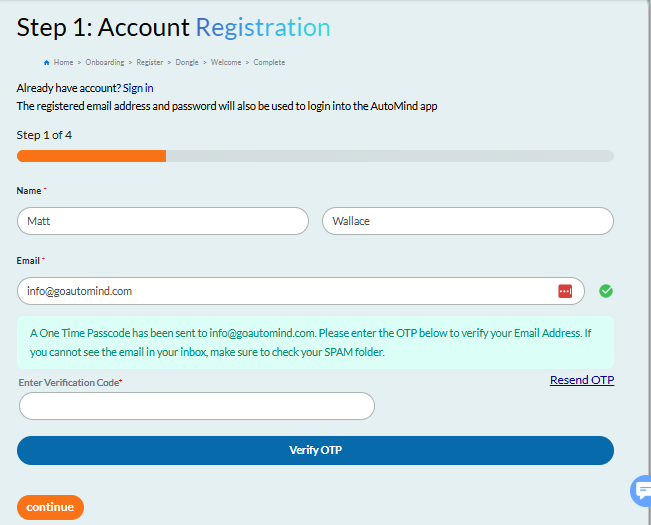
Screen 1: Enter your name and email address. Then click the [Send OTP] button, this will send you a One Time Password (Verification Code) via email which you must enter and click the blue [Verify OTP] button, once verified this blue button will be replaced by an orange [Verified โœ”] confirmation and you can then select the [Continue] button below to proceed to Screen 2...

Name and Email

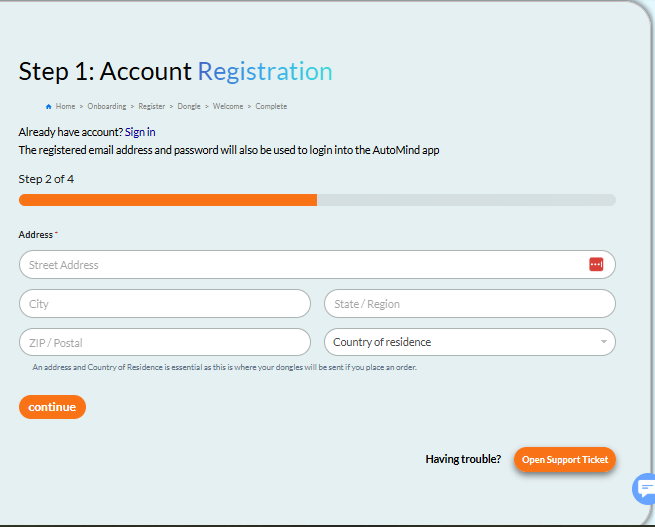
Screen 2: Here we require your full address including Country of Residence, if you are ordering dongles this will be where we send them so please do ensure your address is accurate before using the [Continue] button to proceed to Screen 3...

Address Entry

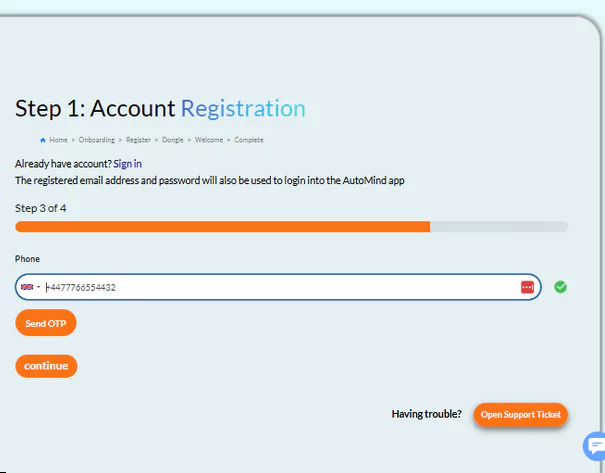
Screen 3: Here you will need to verify a unique mobile phone number, first of all be sure to check the correct country code and then enter your mobile number, then select the [Send OTP] button. This time you will receive the OTP verification code via SMS text message. Just like on screen 1 enter the code and confirm it with the blue [Verify OTP] button, once verified this blue button will be replaced by an orange [Verified โœ”] confirmation and you can then select the [Continue] button below to proceed to the final screen 4...

Phone Number

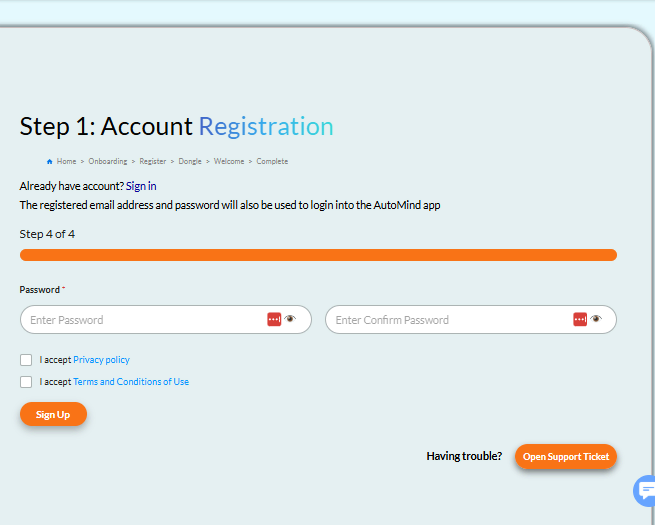
Screen 4: Here we just need you to create you password (be sure to remember this password as you'll need it along with your email address to login on the AutoMind app), accept the Privacy Policy and Terms and Conditions, when you've done so select the [Sign Up] button which will complete your account registration and take you to STEP-2 for purchasing dongles.

Password Setup

{first_name} from {order_city} just {last_name}.

Buy Now